

«Llevamos ya varios años trabajando con Thrax y la verdad es que estamos súper contentos. Nos gestionan la web, el programa de facturación y todo el tema de SEO, y el cambio se nota mucho.La web la dejaron limpia, rápida y fácil de usar tanto para nosotros como para los clientes.
El programa de facturación lo tienen muy bien montado: es intuitivo, nos ahorra un montón de tiempo y no hemos tenido ni un solo problema con las facturas ni con Hacienda.
En SEO también están haciendo un gran trabajo; hemos empezado a subir posiciones y a recibir más visitas orgánicas sin tener que preocuparnos nosotros.
Lo mejor es que responden rápido, son claros y se nota que saben lo que hacen. No es solo que cumplan, es que se involucran y proponen mejoras.
Sin duda los recomendaríamos a cualquiera que busque un equipo serio y profesional.»
Your house on the coast,
in your pocket.
A second home on the Costa Brava that's only used a few months a year. The owners wanted to control everything remotely and avoid nasty surprises. We automated the heating and cooling, blinds and irrigation, with alarms. Now they run the house 100% from their phone.
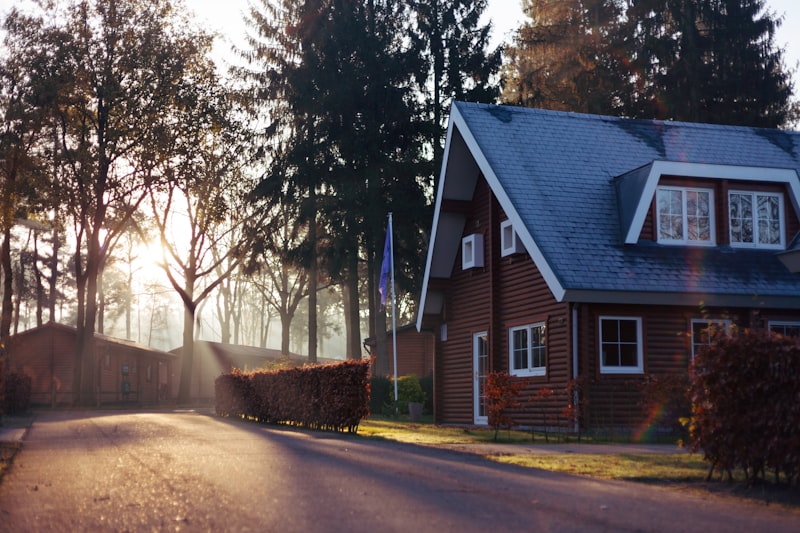
A house left empty half the year
Being far away meant not knowing what was going on, or being unable to react in time.
Away most of the year
No way to keep an eye on leaks, temperature or entrances from hours away.
Risk of nasty surprises
A leak, an open window or a power cut, with nobody there to spot it in time.
Arriving to a cold house
No way to get the house ready (heating, blinds) before arriving.
The whole house, automated
Everything connected and controllable from a single app, wherever they are.
Heating and blinds
Automated, programmable heating, cooling and blinds to get the house ready before arriving.
Automatic irrigation
Scheduled garden irrigation that runs itself, in the low season too.
Alarms and alerts
Alarms with phone alerts for intrusions or incidents, so they can react straight away.
Remote support
We manage it and provide support remotely: if something goes wrong, we look into it without you having to go there.
Peace of mind from afar
An empty house doesn't tell you when something's wrong
The risk with a second home isn't the big disasters: it's the small ones that nobody sees for four months.
A leak in a bathroom nobody uses, a fridge that stops after a power cut, a drain blocked after a storm. None of these is serious on the day it happens; they get expensive because weeks go by before anyone finds them. Automating a house like this is less about comfort than about cutting that delay down to minutes.
That's where the principle that orders everything else comes from: first the sensors that warn you, then the comforts. A leak detector with automatic water shut-off saves more money than any other automation in the house, and costs a fraction of what motorised blinds do.
The second decision is where the intelligence lives. If all the logic sits in the manufacturer's cloud, the day the line goes down the house stops responding — which is exactly the day you'd want to know what's going on. The sensible thing is for the essentials to run locally — thermostats, irrigation, alarm — and for the internet to be used to see and change things from outside, not to make them work.
And all of this rests on something unglamorous: the connection and the power supply. A router without backup power turns a smart home into an ordinary home the moment the lights flicker. In a house that spends half the year on its own, that small piece is what holds everything else up.
Four things, in order of importance
This order saves money: the first two prevent costs, the next two add comfort.
Leak sensor with shut-off
It detects water and closes the main stopcock on its own. It's the automation that prevents the most grief in a house that sits empty for months.
Router with backup
If the connection drops with the first brief power blip, the rest of the system becomes useless. A small backup unit keeps it going.
Make it work without the internet
Heating, irrigation and alarm with local logic. The app is for checking and changing things, not for making the house work.
A single app
Four apps from four manufacturers end up unused. If everything is in one place, people look at it; if not, they give up on it.
What people usually ask
Can a home be automated without building work?+
Much of it, yes. Smart thermostats, leak or door/window sensors and an alarm system can almost always be installed without chasing walls: they're put in place, paired with the central system and up and running in no time, because most of them work by radio and need no new cabling. Where the answer changes is blinds and irrigation, because it depends on how the existing installation in the house is set up: blinds that are already motorised can almost always be integrated without building work, whereas manual blinds do need a motor fitted and, in some cases, a cable run to the fuse box. Irrigation is similar: if there's already a controller and solenoid valves installed, automating it is straightforward; if the irrigation system has to be put in from scratch, that's a building job in its own right. That's why what we look at before quoting is the existing installation, point by point, not the list of what you'd like to have.
What happens if the internet goes down while I'm away?+
If the system is set up properly, the house keeps running on its own during the outage: the thermostat holds the programmed temperature, the irrigation sticks to its schedule and the alarm keeps watching and responding locally, because that logic doesn't live on the internet but in the devices in the house itself. What you do lose while the outage lasts is the remote side: you can't check the status from your phone or change anything remotely until the connection comes back, and you won't get real-time alerts about what's happening either. That's exactly why the essentials shouldn't depend on the manufacturer's cloud: a home used for only a few months a year spends more time with nobody watching than with someone there, so sooner or later the connection will drop at some point. In areas where fixed-line coverage is unreliable, it's worth considering an alternative like the one we explain in Starlink for a second home or country house, to cut down those outages.
Does the alarm need to be connected to a monitoring centre?+
Not necessarily. With an alert sent straight to your phone, you or whoever you choose find out instantly that a sensor has gone off, and in many cases that's enough if there's someone — a neighbour, a relative, the person who looks after the property — who can get there quickly to check what's happened. What a monitoring centre adds is that someone responds even when you can't: if nobody nearby is available to go, or if you'd rather the response didn't depend on you seeing your phone in time, the centre alerts the police or a verification company following a set protocol. The decision isn't technical; it's about who can respond in your particular case: in a second home with someone you trust nearby for much of the year, a direct alert is usually enough; if the house really is on its own, with nobody to call, the monitoring centre stops being an extra and becomes the missing piece.
Can it be added in stages?+
Yes, and that's usually the most sensible approach in a home that's only used part of the year, because you don't need to automate everything at once to start noticing the difference. The sensible place to start is with the sensors that warn you of a real problem — a water leak, an unauthorised entry, a power cut — and leave comforts like heating or blinds for later: they improve the experience but don't prevent a nasty surprise if something goes wrong while the house is empty. The one thing worth getting right from the very first step is the system everything else will be built on, because switching ecosystems halfway often means replacing what's already installed rather than simply adding to it. Choosing that foundation well at the start, even if the first phase is small, is what stops you ending up with several apps from different manufacturers that don't talk to each other and that nobody ever ends up opening.
What internet connection makes sense in an area with limited fixed-line coverage, like the Costa Brava?+
It depends on what's available at the exact spot where the house is, because coverage in coastal or remote inland areas can vary a lot from one plot to the next. The first thing to check is whether fibre or a good, stable 4G/5G signal reaches it, because when it does, that's usually the simplest and cheapest option. When fixed-line coverage doesn't reach or is unreliable, satellite or point-to-point radio alternatives come into play, which don't depend on cable infrastructure being nearby. Each has its conditions: one needs a clear view of the sky, the other depends on line of sight to a relay antenna. What makes no sense is deciding this without seeing the actual location, because the solution that works on one plot may not work a hundred metres further on. We compare the options in detail in satellite internet versus Starlink, which is exactly the kind of decision worth making before automating anything.
How are recordings and alerts stored if the house is empty for months?+
It depends on what you want to keep and for how long, because a history of temperatures or door openings isn't the same as camera recordings, which take up far more space. Usually, the system keeps a limited history locally, on the device itself, and important events — a leak alert, an entry outside normal hours — are also sent to a copy outside the home, precisely so that if something happens to the local equipment during the months the house is empty, the record of what happened isn't lost. The underlying rule is the same as for any backup: a single copy in the same place as what it protects isn't a reliable copy. How to split that history between what stays in the house and what goes off-site is the same decision as for any home backup, and we explain it in NAS or cloud for backups.
Shall we look after your second home?
What our clients say
Our clients write them on Google and we show them here exactly as they are.
«Muy rapidos y professionales, lo recomiendo 100%»
«Cámaras de seguridad · Canovelles
Instalaron las cámaras del negocio de forma muy limpia y ahora podemos verlo todo desde el móvil. Muy profesionales y atentos durante todo el proceso.»
«Llevamos el ordenador con varios problemas y nos explicaron todo de forma clara. Diagnóstico rápido, presupuesto cerrado y trato excelente.»
«Gran servicio! Contacté por WhatsApp con ellos y pasando un par de fotos para entender la instalación que requería tenía un presupuesto aproximado y cita para el día siguiente. Trabajo limpio y rápido.»
Shall we connect
your home?
Tell us what your home is like and what you'd like to control, and we'll propose a tailored smart home set-up with a fixed quote. Free diagnosis, no obligation.
644 836 122CALL OR WHATSAPP USTell us about your project
Fill it in and we'll call you. Easy.